Build a Simple Lock
- Protobuf, only if installing
ckb-debuggerreports thatprotocis missing
Setup checks and platform notes
Verify the required commands before starting:
git --version
node --version
pnpm --version
offckb --version
ckb-debugger --version
Installing ckb-debugger compiles native dependencies and can
take around ten minutes. Install it with
cargo install ckb-debugger. If installation reports
Could not find protoc, install protobuf and retry:
# macOS
brew install protobuf
cargo install ckb-debugger
Windows:
Add the npm global bin directory and
%USERPROFILE%\.cargo\bintoPATH.If pnpm reports
ERR_PNPM_IGNORED_BUILDS, approve the required dependency build scripts and reinstall.Keep the repository in a path without
#; Next.js asset resolution can fail in such paths.If native tooling remains difficult to configure, use WSL or a Linux Codespace.
What You Will Build
This tutorial builds a full-stack CKB dApp with a Lock Script named hash-lock. The Script stores the hash of a secret in its arguments. A transaction may consume Cells protected by that Script only when its witness contains a preimage whose blake2b-256 hash matches.
You will:
- Build and deploy the Script with OffCKB;
- Derive a CKB address from the deployed code and a preimage hash;
- Deposit Devnet CKB into Cells protected by that address;
- Submit the correct preimage and wait for the transaction to commit.
This hash lock proves knowledge of a secret, not identity or ownership. The preimage is disclosed publicly when it is used, so do not use this example with valuable funds. The runnable flow supports Devnet and Testnet.
The example uses JavaScript/TypeScript on ckb-js-vm. For production Scripts, start with Rust and a signature-based authorization design.
Run the Example on Devnet
1. Download the Source
git clone https://github.com/nervosnetwork/docs.nervos.org.git --depth 1
cd docs.nervos.org/examples/dApp/simple-lock
pnpm install
You can also inspect or download the example from the repository.
2. Start Devnet
To interact with the dApp, ensure that your Devnet is up and running. After installing @offckb/cli, open a terminal and start the Devnet with the following command:
- Command
- Response
offckb node
Launching CKB devnet Node...
CKB devnet RPC Proxy server running on http://127.0.0.1:28114
Keep the Devnet running throughout the tutorial. Open another terminal to list the pre-funded accounts:
- Command
- Response
offckb accounts
Print account list, each account is funded with 42_000_000_00000000 capacity in the genesis block.
[
  {
    pubkey: '0x02025fa7b61b2365aa459807b84df065f1949d58c0ae590ff22dd2595157bffefa',
    lockScript: {
      codeHash: '0x9bd7e06f3ecf4be0f2fcd2188b23f1b9fcc88e5d4b65a8637b17723bbda3cce8',
      hashType: 'type',
      args: '0x8e42b1999f265a0078503c4acec4d5e134534297'
    },
    address: 'ckt1qzda0cr08m85hc8jlnfp3zer7xulejywt49kt2rr0vthywaa50xwsqvwg2cen8extgq8s5puft8vf40px3f599cytcyd8',
    args: '0x8e42b1999f265a0078503c4acec4d5e134534297'
  },
  {
    pubkey: '0x026efa0579f09cc7c1129b78544f70098c90b2ab155c10746316f945829c034a2d',
    lockScript: {
      codeHash: '0x9bd7e06f3ecf4be0f2fcd2188b23f1b9fcc88e5d4b65a8637b17723bbda3cce8',
      hashType: 'type',
      args: '0x758d311c8483e0602dfad7b69d9053e3f917457d'
    },
    address: 'ckt1qzda0cr08m85hc8jlnfp3zer7xulejywt49kt2rr0vthywaa50xwsqt435c3epyrupszm7khk6weq5lrlyt52lg48ucew',
    args: '0x758d311c8483e0602dfad7b69d9053e3f917457d'
  },
  #...
]
Private keys are hidden by default. If the tutorial asks you to copy a Devnet private key, append --show-private-keys:
offckb accounts --show-private-keys
Use plain offckb accounts for everyday account checks. These are public development keys for the local OffCKB Devnet; never use them for Mainnet or real assets. See OffCKB's account documentation.
Resetting Devnet creates a new chain. Every OutPoint from the previous chain becomes invalid, so redeploy the contract after a reset.
3. Build and Deploy the Script
Build the TypeScript contract into CKB-VM bytecode:
- Command
- Response
pnpm build
Building 1 contract(s): hash-lock
📦 Bundling with esbuild...
🔧 Compiling to bytecode...
✅ Contract 'hash-lock' built successfully!
🔗 Bytecode: dist/hash-lock.bc
Deploy it to Devnet:
- Command
- Response
pnpm run deploy -- --network devnet
🌐 Network: devnet
contract hash-lock.bc deployed
wait for tx confirmed on-chain...
tx committed.
🎉 Deployment completed successfully!
🔄 Contract deployment synchronized: frontend/deployment/scripts.json
🔄 System scripts synchronized: frontend/deployment/system-scripts.json
📍 Contract OutPoint: 0x...:0
📍 ckb-js-vm OutPoint: 0x...:15
Deployment creates or updates deployment/scripts.json and refreshes deployment/system-scripts.json. The deploy script validates the hash-lock.bc and ckb-js-vm entries for Devnet, copies both files to frontend/deployment/, and fails if either copy does not match its source.
An OutPoint is a transaction hash plus output index that identifies one specific Cell. OutPoints are network-specific. They become stale after redeployment, a network switch, or a Devnet reset.
4. Start the Frontend
cd frontend
pnpm dev
Open http://localhost:3000. When NEXT_PUBLIC_NETWORK is unset, the frontend uses Devnet.
Before enabling transfers, the page calls getCellLive for both required dependencies:
- The Cell containing your deployed
hash-lock.bcbytecode; - The Cell containing the
ckb-js-vminterpreter.
If either OutPoint is missing or stale, the page shows recovery guidance instead of constructing a transaction.
5. Create and Fund a Hash Lock
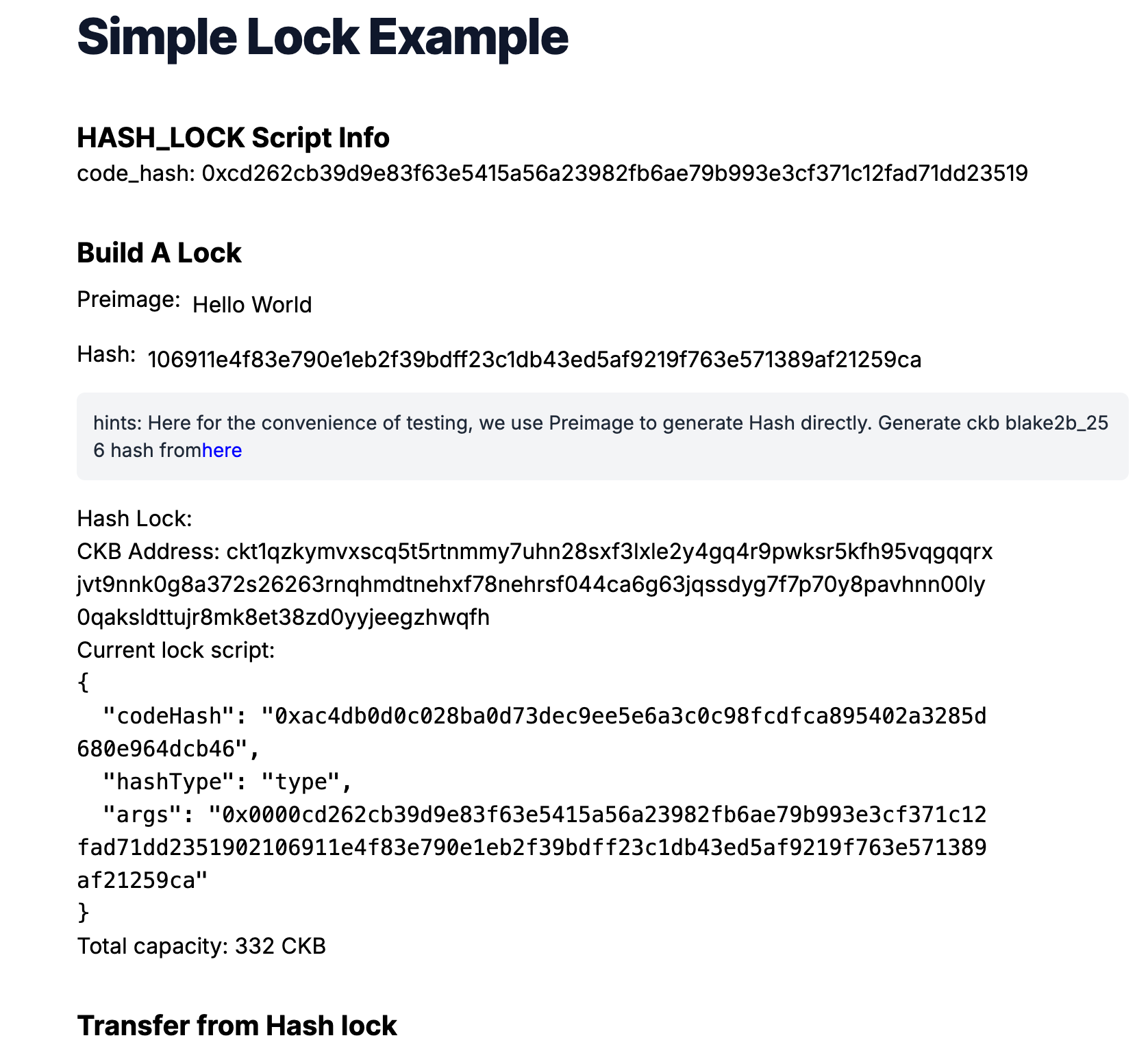
Enter a nonempty preimage such as Hello World. The frontend hashes it and creates a Lock Script that combines:
- The
ckb-js-vminterpreter code hash; - The deployed
hash-lock.bccode hash and hash type; - The expected preimage hash.
The page displays both a contract code hash and a CKB address. They are not interchangeable:
- The code hash identifies deployed bytecode;
- The CKB address encodes the complete Lock Script, including its arguments, and is the value you fund.
Copy the generated hash-lock address and deposit Devnet CKB:
offckb deposit --network devnet <HASH_LOCK_ADDRESS> 300
The returned transaction hash proves only that the transaction was submitted. Wait for commitment, then refresh the page and confirm that Total live capacity shows the deposit before transferring.
6. Optional: Test Rejection with a Wrong Preimage
In Preimage to reveal, enter a value different from the one used to create the address and select Transfer CKB.
The Script returns 11, and the frontend reports that the preimage does not match. CKB rejects the transaction atomically: no output becomes chain state, the original input Cells remain live, and their capacity is unchanged.
7. Transfer with the Correct Preimage
Enter the original preimage and submit again. The frontend reports each phase:
submitting → pending → committed
It keeps the transaction hash and uses cccClient.waitTransaction() rather than assuming that a fixed delay means success.
How the Script Works
The on-chain logic is intentionally small:
- read the expected hash from the Script arguments;
- read the preimage from the group-input witness;
- hash the preimage with CKB's
blake2b-256function; - return
0when the hashes match or11when they do not.
import * as bindings from "@ckb-js-std/bindings";
import { HighLevel, log, hashCkb, bytesEq } from "@ckb-js-std/core";

function main() {
  log.setLevel(log.LogLevel.Debug);
  const expectedHash = new Uint8Array(HighLevel.loadScript().args).slice(35);
  const witnessArgs = HighLevel.loadWitnessArgs(0, bindings.SOURCE_GROUP_INPUT);
  const preimage = witnessArgs.lock!;
  const actualHash = hashCkb(preimage);

  if (!bytesEq(actualHash, expectedHash.buffer)) {
    return 11;
  }
  return 0;
}

bindings.exit(main());
The first 35 bytes of args tell ckb-js-vm which bytecode to execute. The remaining 32 bytes contain the expected preimage hash.
How the Frontend Builds the Address
export function generateAccount(preimage: string) {
  if (!preimage) {
    throw new Error(
      "Enter a nonempty preimage before generating a funding address."
    );
  }
  const hash = ccc.hashCkb(stringToBytesHex(preimage)).slice(2);
  const { contract, ckbJsVm } = deploymentConfig();
  const lockArgs =
    "0x0000" +
    contract.codeHash.slice(2) +
    hexFrom(hashTypeToBytes(contract.hashType)).slice(2) +
    hash;
  const lockScript = ccc.Script.from({
    codeHash: ckbJsVm.codeHash,
    hashType: ccc.hashTypeFrom(ckbJsVm.hashType),
    args: lockArgs,
  });

  return {
    address: ccc.Address.fromScript(lockScript, cccClient).toString(),
    lockScript,
  };
}
An address is an encoded representation of a Lock Script. The displayed balance is the sum of live, pure-CKB Cell capacities protected by that exact Script; typed or data-bearing Cells are not selected. It is not an account balance stored inside the contract.
How the Frontend Builds the Transaction
export async function unlock(
  fromAddr: string,
  toAddr: string,
  amountInCKB: string,
  preimage: string
): Promise<string> {
  const fromScript = (await ccc.Address.fromString(fromAddr, cccClient)).script;
  const toScript = (await ccc.Address.fromString(toAddr, cccClient)).script;
  const amount = ccc.fixedPointFrom(amountInCKB);
  const { contractCellDep, ckbJsVmCellDep } = deploymentConfig();
  const readSigner = new ccc.SignerCkbScriptReadonly(cccClient, fromScript);

  const transaction = ccc.Transaction.from({
    outputs: [{ lock: toScript, capacity: amount }, { lock: fromScript }],
    outputsData: ["0x", "0x"],
  });

  await transaction.addCellDeps(contractCellDep, ckbJsVmCellDep);
  await transaction.completeInputsByCapacity(readSigner);
  transaction.setWitnessArgsAt(
    0,
    ccc.WitnessArgs.from({ lock: stringToBytesHex(preimage) })
  );
  await transaction.completeFeeChangeToOutput(readSigner, 1, 1000);
  assertOutputCapacities(transaction);

  return cccClient.sendTransaction(transaction);
}
Both CellDeps are required. ckb-js-vm provides the interpreter, while hash-lock.bc provides the program it loads.
The recipient output has a fixed requested capacity. The second output receives the remaining capacity after the fee and intentionally uses the original hash lock.
Occupied Capacity
A valid Cell must reserve enough capacity to store its complete structure. The requirement depends on its Lock Script, optional Type Script, and output data:
occupied capacity = (CellOutput occupied bytes + output-data bytes) × 1 CKB
Therefore, 61 CKB is not a universal minimum. The frontend calculates and validates the actual occupied capacity of both outputs after fee completion.
The transaction order also matters: the witness changes transaction size, so it is set before the final fee is calculated. See the CCC transaction composition guide for the supported patterns.
Security: What This Example Does Not Prove
The witness contains the preimage in public transaction data. Anyone observing a pending or committed transaction can read it. The Script checks only the hash; it does not check who submitted the transaction or which recipient should benefit.
This frontend intentionally demonstrates another unsafe behavior: it returns change to the same hash lock. After the preimage is disclosed:
- returned change is protected by a public secret;
- untouched Cells using the same hash are also vulnerable;
- another party may copy the preimage and construct a competing transaction.
For real assets, use a standard signature-protected change address and bind authorization to the intended transaction. If a protocol genuinely needs a hash preimage, combine it with signatures, unique secrets, and an appropriate timeout or refund path.
Run on Testnet
Testnet requires a separate deployment because Devnet OutPoints do not exist there.
-
Create a Testnet private key and fund its address from the CKB Testnet Faucet.
-
From the example root, deploy with the funded key:
pnpm run deploy -- --network testnet --privkey 0x... -
The deploy command validates and synchronizes the new Testnet contract and system-script artifacts automatically.
-
Start the frontend for Testnet:
cd frontend
pnpm dev:testnet -
Confirm the page reports both dependencies as ready before depositing Testnet CKB.
Never reuse a Devnet address, transaction hash, or contract OutPoint on Testnet.
About Mainnet
This example does not currently provide a direct Mainnet deployment path. OffCKB supports direct contract deployment only to Devnet and Testnet, and its Mainnet system-script export does not include the ckb-js-vm dependency required by this contract. Removing the local network check would only move the failure later in the deployment.
For Mainnet-state inspection and debugging, use an isolated OffCKB Mainnet fork and follow its replay-risk guidance. The intentionally unsafe change behavior described above still applies, and this tutorial's frontend remains configured for Devnet and Testnet.
Conclusion
You deployed bytecode as a Cell, used its code hash to construct a Lock Script, funded live Cells protected by that Script, and verified both rejected and committed state transitions. You also saw why a preimage is a bearer proof rather than proof of ownership, why dependency OutPoints must match the active network, and why every output must satisfy its own occupied-capacity requirement.
This simple hash lock clearly demonstrates how hash-based authorization works, but its security weaknesses make it unsuitable for protecting real funds. Production applications should use a stronger authorization design.